Forge Containers Observability

OVERVIEW

Shaping the monitoring experience for Atlassian's new container runtime. I designed the observability experience including improved invocation response time metrics, dynamic log filtering, container service health view, and container registry.

TIMELINE

Oct 25 - Mar 26

ROLE

Product and UI content designer

SERVICES

Prototyping
Product design
Copywriting
Research
Motion design

TOOLS

Figma
Replit
Cursor
Atlassian Design System

About the project

Forge is Atlassian's cloud app platform. When it introduced containers — giving developers the ability to run long-running services — the developer console had no way to help them understand whether their containers were healthy, why invocations were slow, or what was happening in their logs.

Why containers changed everything

Forge originally ran all app code as serverless functions. The developer console's monitoring tools (e.g., invocation metrics, logs, alerts) were built around that model: short-lived executions, a single runtime, predictable resource usage. Containers challenged the existing model.

With containers, developers could now run long-lived services with persistent state, multiple instances across regions, independent scaling, and custom resource allocations. A single Forge app might have three container services and two serverless functions, each with different performance characteristics. But the developer console still treated everything as if it were a function.

This created three concrete problems I designed for

Invocation metrics were split and misleading.

Container invocation response times could not be displayed with the existing invocation response time metrics.

▮▯▮▯▮

Logs lacked filtering for container contexts.

Container logs mixed output from multiple services and instances. Without the ability to filter dynamically by service, instance, or severity, developers would resort to their own methods such as Ctrl+F through raw log dumps.

No container health visibility at all.

There was no way to see whether container instances were running, terminated, or consuming excessive resources. Developers would discover outages when their end-users reported them.

One unifying insight from research

(Above) Created an interactive holistic prototype transferring the designs from Figma to Replit and Cursor for the research sessions with five of our largest Marketplace partners

The PM facilitated five research sessions with Forge container partners (Communardo, Refined, Capable Software, Appfire, and Tempo) during March 2026. I built the prototypes used in those sessions using Replit and Cursor, attended as a note-taker, synthesised the findings into the design plan, and used the output to prioritise feature scope with the team. I then shared the findings and design directions with the Observability team, incorporated their implementation feedback, and iterated on the designs. These are established Atlassian Marketplace vendors who provided feedback on not just service health but the overall container observability experience.

This insight became the organizing design principle:

The developer console is a triage layer, not a monitoring tool. Design for fast scanning and clear status signals helping developers answernswer "Is it healthy?" and "What changed?" 

Design #1: Restructuring the console's information architecture

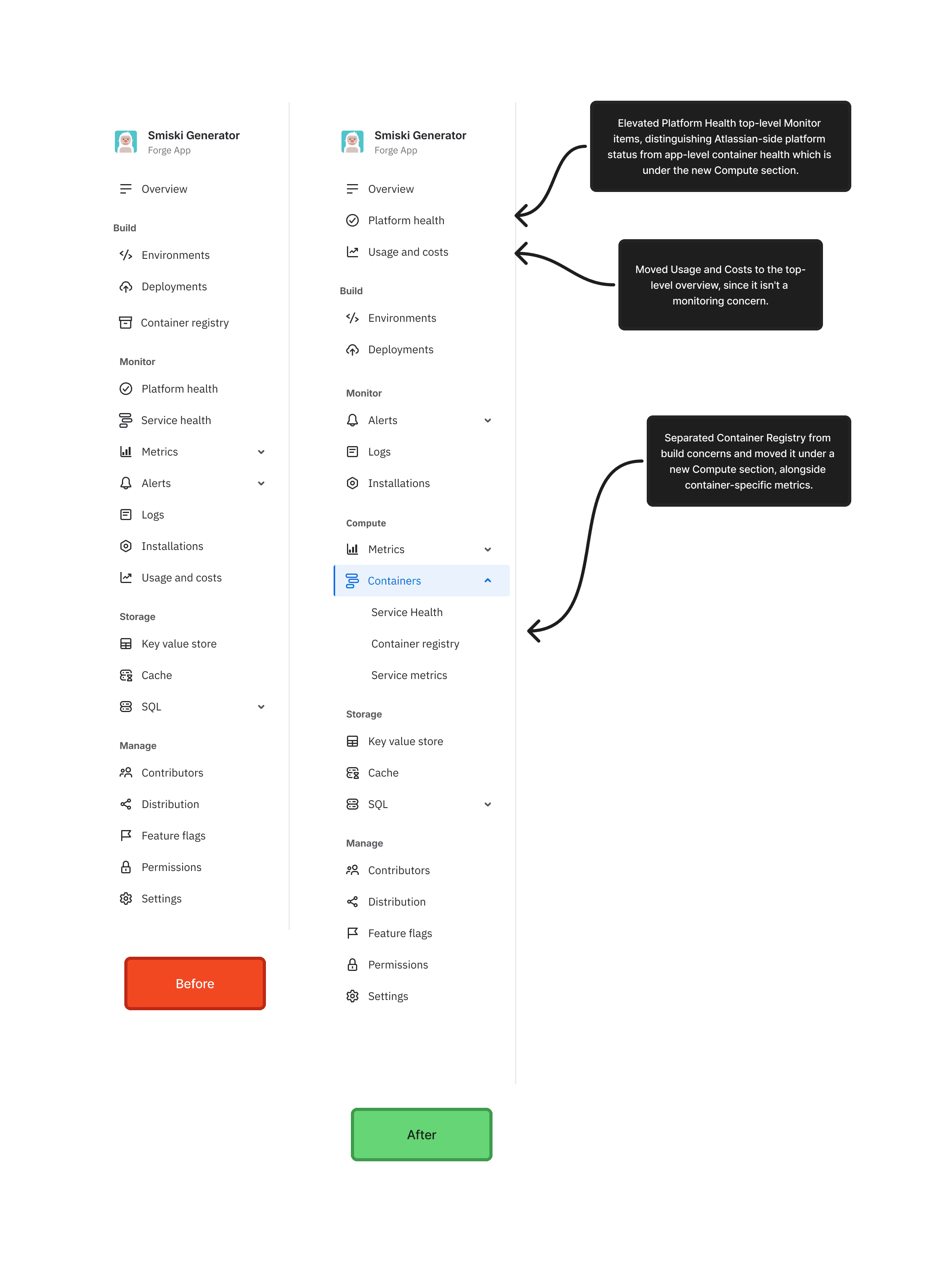
Before I could present any individual feature, I had to address a structural problem: the console's navigation had no logical home for container-specific monitoring. Metrics, logs, and alerts were organised around the function model. Containers came after -  the Container Registry page existed under Build, but monitoring lived under the Monitor section that assumed a single runtime type.


Why? 

The IA tree would continue to expand as new features shipped. The existing structure mixed user journeys and feature groupings without a consistent logic - which works at small scale but breaks as each section grows. The restructure I proposed applied a hybrid approach: journey-level sections (Build, Monitor, Compute, Storage, Manage) with feature groupings nested within them, so growth is predictable and each section has a clear job.


The restructure I proposed:

  • Separated Container Registry from build concerns and moved it under a new Compute section, alongside container-specific metrics.

  • Elevated Platform Health top-level Monitor items, distinguishing Atlassian-side platform status from app-level container health which is under the new Compute section.

  • Moved Usage and Costs to the top-level overview, since it isn't a monitoring concern.

Design #2: Improved invocation response time (shipped)

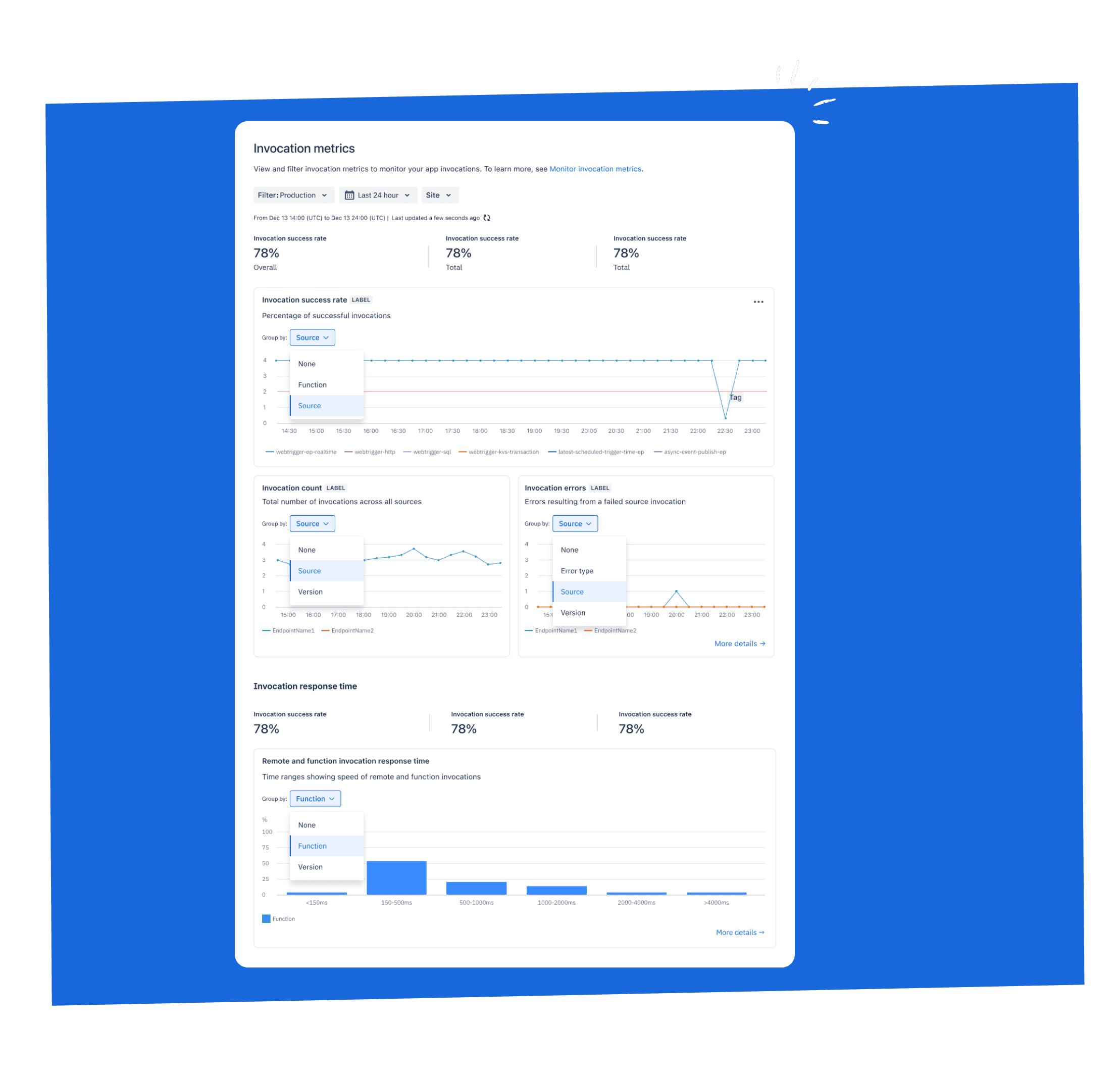
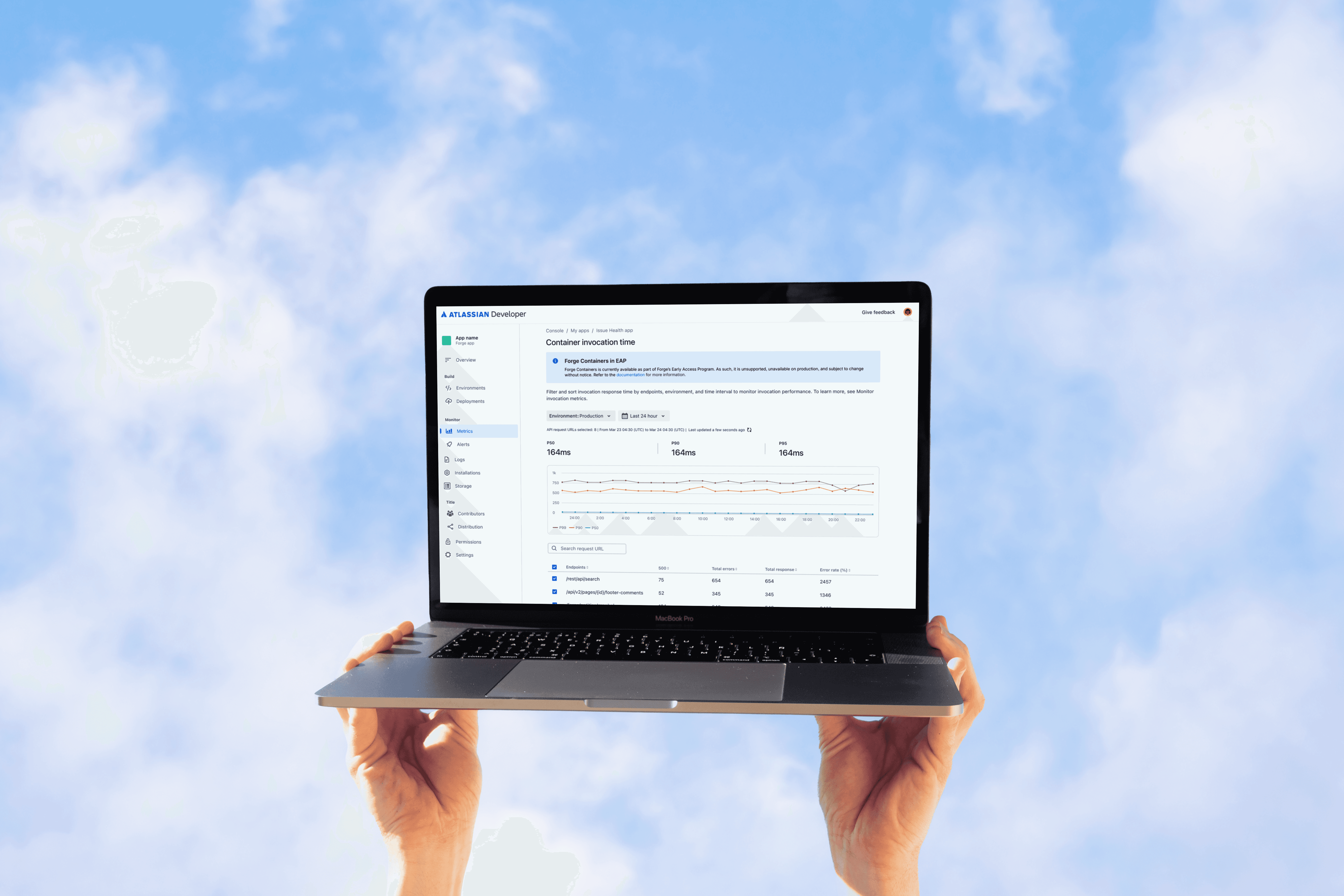
The existing Invocation Metrics page showed function invocation data: success rate, invocation count, errors, and response time. When containers launched, a separate Container Invocation data was added in the EAP. This revealed an immediate problem: the existing data structure for the invocation response time metric cannot ingest data from the container invocation response time. 

What I designed:

An improved Invocation Response Time view that combines container and function invocation data in a single page as part of the future state but a separate container-specific invocation time for EAP. The design introduces source-type filtering (container vs. function vs. all), environment and time-range selectors, and a breakdown table showing P50, P90, and P99 latencies per source. The summary cards at the top show aggregate percentile values that update based on filter state.

Per source breakdown

Across all of the metric within invocation metrics except for remote and function response time

Histogram for container invocation responses with site breakdown

Separate chart for container invocations for the Early Access Program (EAP) with a site breakdown

Future state for holistic invocation response time

Once the technical constraint is addressed, remotes and endpoints can be displayed as a histogram along with container invocations

Design #3: Dynamic log filtering (shipped)

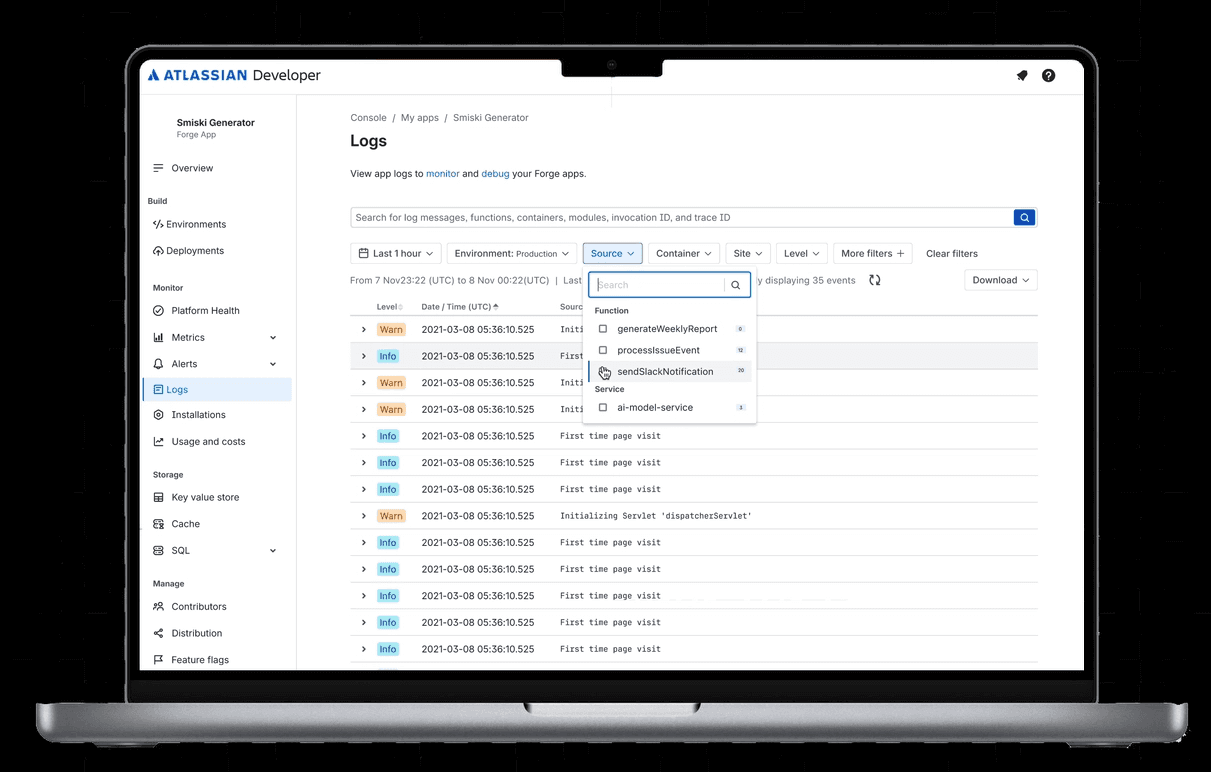
The existing Logs page showed a chronological list of log entries with no filtering specific for containers. For container apps running multiple services across environments and regions, it makes filtering much more arduous. From research, developers told us they stopped checking console logs entirely and exported everything to external tools via API.

What I designed:

A dynamic filtering system for the Logs page that lets developers filter by source (container service name, function name) in addition to the existing log level (info, warning, error),  environment, and free-text search. Filters are composable - selecting a service and an error level shows only errors from that service. From service health, metrics can deep link into the dynamic filtering system allowing developers to share filtered log views with teammates.

Key interaction details:

Filter options are dynamically populated based on the app's actual log sources. If an app has three container services and two functions, the source filter shows exactly those five options — avoiding a generic list and reducing cognitive load. I also deliberately elevated the source filter above the fold, ahead of the "More filters" control, because service and instance are the primary axes developers need before anything else.

Partners also requested the ability to "filter by function to see which customer/tenant is calling the most" — a time-vs-invocations graph per function and customer. I scoped this to the design backlog rather than the initial release.

Design #4: Container service health view

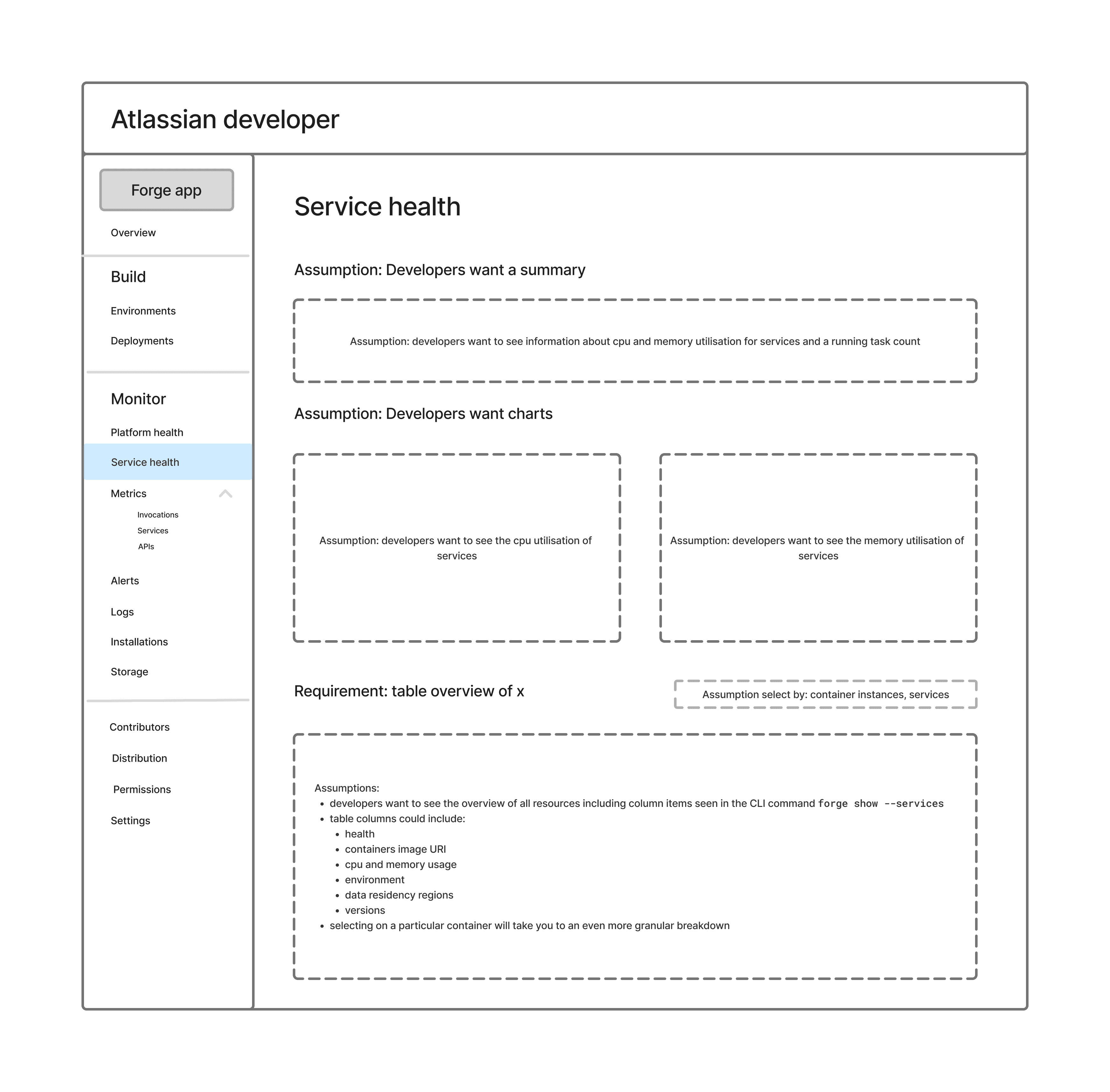
This was the largest and most complex piece of the observability work. The previous two features improved existing pages. Service health was a new surface entirely to create a dedicated view for understanding the runtime state of container services.

The design has two levels

Overview level: a table of all service instances across environments and regions, with status (Available/Unavailable), running instance counts, and filterable by service, status, environment, and cloud type. Partners had strong opinions about the default view — one requested: "I would split the sections by environments or to show by default production one." I chose environment filtering over section-splitting because it scales better as the number of environments grows, but defaulting the filter to production was a direct incorporation of this feedback. This answers "Is it healthy?" at a glance, starting with what matters most.

Detail level: clicking a service opens a detail view showing CPU and memory usage (current values and time-series charts), plus a table of individual container instances with their status, resource consumption, and lifecycle timestamps. This answers "What changed?" by making it possible to spot a terminated instance, see its resource usage at time of termination, and link directly to its logs.

Critical design decisions

1. Per-instance data over aggregated averages. One partner explicitly asked for this differently: "The main view for me should show an average of the CPU/memory usage of the different instances in the service so I see directly if we are having an issue in general in the service." I understood the need — quick issue detection — but chose a different solution. An aggregate CPU average across instances can read 50% while one instance is at 95% and about to OOM-kill. Instead of averages, I designed the detail view with a median trend chart (for the at-a-glance signal the partner wanted) paired with a per-instance table (for the actionable detail that averages hide). This gave partners both the overview and the specificity, rather than forcing a choice.

2. Show terminated and expired containers. The platform originally removed terminated containers from the API response. I raised the need for a Show Expired toggle and a 30-day data retention window with the Compute team, who were investigating whether the API could expose terminated container data within that window. The rationale: incident investigation is retrospective — developers need to see what was running when the problem occurred, not just what's running now.

3. Version visibility over timestamps. Partners were direct about what metadata mattered: "I don't think that the created at or updated at give me much information. I would prefer to see the version that is deployed, otherwise I will have to check which version." This reshaped the instance table columns — I replaced the generic timestamps with the deployed image version and added a link to the container registry detail, so developers could trace from a misbehaving instance directly to the image that produced it.

4. Pagination and search from day one. Partner research revealed that production apps generate 100+ service instances across regions. I designed pagination and search into the initial version rather than treating them as V2 features, because the feature would be unusable at real scale without them.

The design backlog as a product artifact

Research surfaced 13 design items, but only a subset could ship in the initial release. Rather than letting the remaining items become a vague future-work list, I structured them into a design backlog that served as a planning artifact for the cross-functional team.

Each item in the backlog includes: the problem statement (grounded in a specific user behaviour observed in research), which research sessions surfaced it, current design status, design checklist, and open questions that need engineering input. This format made the backlog useful to PMs for roadmap prioritisation, to engineers for scoping, and to me for maintaining research traceability.

Of the 13 items: 2 shipped in the initial EAP release (improved invocation metrics, dynamic log filtering), 4 were actively in progress at the point of the June IC launch (service health view, searchable dropdowns, terminated container visibility, dev console IA), and 7 were scoped to the post-launch roadmap (alerts, deployment history, data retention docs, version traceability, image list search, refresh behaviour, installation filter).
Working across two teams

This project required coordination across the Compute team (who own the container runtime and APIs), the Observability team (who own the developer console and were the implementation team for service health). I was the designer across all three.

The Observability team weren't opposed to the design direction, but the process involved real back-and-forth. They brought implementation constraints and existing console patterns I didn't have full context on — which added scope items to the design rather than reducing them. Managing that feedback loop was less about selling a vision and more about synthesising additional context into designs that could actually be built. I tracked the resulting scope additions through the design backlog to keep them visible to the PM

Outcome and impact

The improved invocation response time view and dynamic log filtering shipped with the Forge Containers public EAP. The service health view moved into active development with the Observability team ahead of the June IC launch. I was working on implementation specs with the team at the time I left Atlassian.

Impact of shipped features:

  • The improved invocation response time allowed developers to view metrics for containers,functions, and endpoints as part of the EAP. This provided a means for additional performance investigation and a channel for them to provide feedback.

  • Partners using Forge containers previously used API log exports to do meaningful filtering of container logs. The dynamic filtering system gave developers a first-pass triage step directly in the console, reducing dependency on their own tooling for initial debugging.

  • The IA restructure created a scalable navigation model that cleanly separates build, monitor, and compute concerns - a structure that will accommodate future releases.

Reflection

The scope boundary was the hardest design decision, not the UI. Most of my time wasn't spent on layouts or interactions — it was spent figuring out what the console should not do. The triage-layer framing gave that judgment a name and made it defensible, but it was still uncomfortable to cut features that had real user demand (alerts, deployment history) in favour of shipping a coherent, focused experience. One concrete example: the Observability team's feedback consistently pushed toward richer monitoring views — aggregate dashboards, trend history, alert configuration. Each of those requests was reasonable in isolation. Holding the triage-layer boundary required going back to the research data repeatedly, not just asserting a principle.

Designing for infrastructure developers is an exercise in restraint. These users are technical, opinionated, and have strong preferences about their toolchain. The most respectful thing a platform tool can do is not try to be everything. The console works because it knows it's a starting point, not a destination. That principle sounds simple, but implementing it required saying no to well-intentioned proposals from engineering and product partners who had a different mental model of what the console should be.

Create a free website with Framer, the website builder loved by startups, designers and agencies.